Automatic time tracking for macOS

It knows where your day went. Nobody else does.

Calliday records every app, window, site and document you touch — automatically, on your Mac and nobody else's — then writes the day up for you. No timers. No account. $39, lifetime.

Download for macOS See plans
Free 7-day Pro trial — no account, no card · macOS 14+ · Apple Silicon & Intel
Tuesday, your timeline 7h 42m tracked
9:0011:0013:0015:0017:00
Deep work · 3h 28m Meetings · 41m Email · 1h 14m Browsing · 37m Away
✦ Written for you

A focused Tuesday. 3h 28m of deep work, most of it in one unbroken stretch before lunch. Email took 1h 14m, and meetings only 41m — the lightest of the week so far.

Three minutes, the whole app.

A plain screen recording, nothing staged: the Overview, a day on the timeline, the journal it writes, the graph of what you moved between, and the rules that file it all away.

Plays right here — nothing loads from YouTube until you press play. Watch it on YouTube instead.

It knows the document, not just the app.

Most trackers stop at “Safari, 2h 14m.” Calliday goes one level down — the page, the email, the note, the file, the conversation — and one click on any line takes you straight back to it.

Safari Mail Obsidian Chrome Messages PDF Expert Firefox Notes Outlook Arc Books Spark Edge Bear News Brave WhatsApp Preview Orion Calendar Kindle Journal DuckDuckGo Reminders Things Dia
Xcode Word Claude Cursor Excel FaceTime Warp PowerPoint ChatGPT GitHub Desktop Pages Zoom Terminal Keynote Telegram Tower Numbers Perplexity PyCharm Photos Music WebStorm Pixelmator Pro Postman OmniGraffle
Browsers Mail Notes & writing Documents & PDFs Reading Messaging & calls Calendars & reminders Code & terminals

…and every other app on your Mac. Anything that answers macOS about its window and open document is tracked the same way — no plugin, no list to maintain.

It watches, so you don't have to.

Install once. Calliday keeps the books in the background while you work. Keep scrolling.

01 · TRACKING

Every minute, accounted for.

Calliday records the app, window, website, and document you're focused on — second by second, with time away handled sensibly. No timers. Nothing to remember.

02 · LOCAL-FIRST

It all stays on your Macs.

Your entire history lives on your own Macs and nowhere else — that is the whole architecture. No server of ours, no account, no telemetry. Unplug the internet; Calliday doesn't even notice.

03 · ASK CLAUDE

Your day, on speaking terms.

One click connects Calliday to Claude Desktop or Claude Code. Calliday runs an MCP server on your Mac, so Claude can query your own tracked time — summaries, focus metrics, what's happening right now — and answer in plain language. Nothing is uploaded; Claude asks, your Mac answers.

04 · RULES

Rules turn hours into projects.

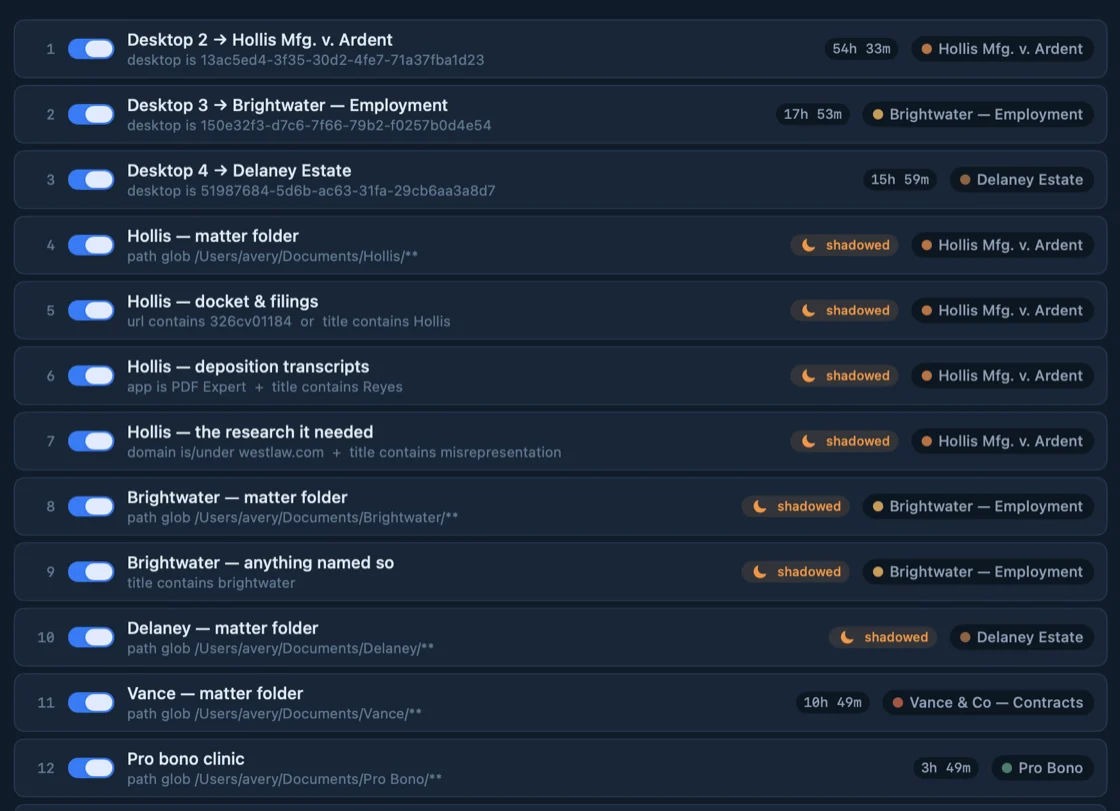
"Anything on the Acme site counts as Client A." Write a rule once and every matching minute sorts itself from then on — including the time already on your timeline. Match on a name, a glob, a subdomain, or a regular expression when you need the precision.

05 · CONTEXT

The leftovers file themselves.

No set of rules catches everything — there is always a stretch of work that matches nothing. Calliday reads what surrounds it: the work either side, and the words in its own title. When the evidence is clear it files the time for you. When it isn't, it says so and leaves it alone.

06 · AI SUGGESTIONS

AI drafts your rules. You decide.

One click sends a private, aggregated snapshot of your uncategorized time — back come ready-made rules and projects. Reassign, untick, accept: nothing changes without your OK, and what you decline is never sent again. Included with every plan.

07 · INSIGHT GRAPH

See what pulls you away.

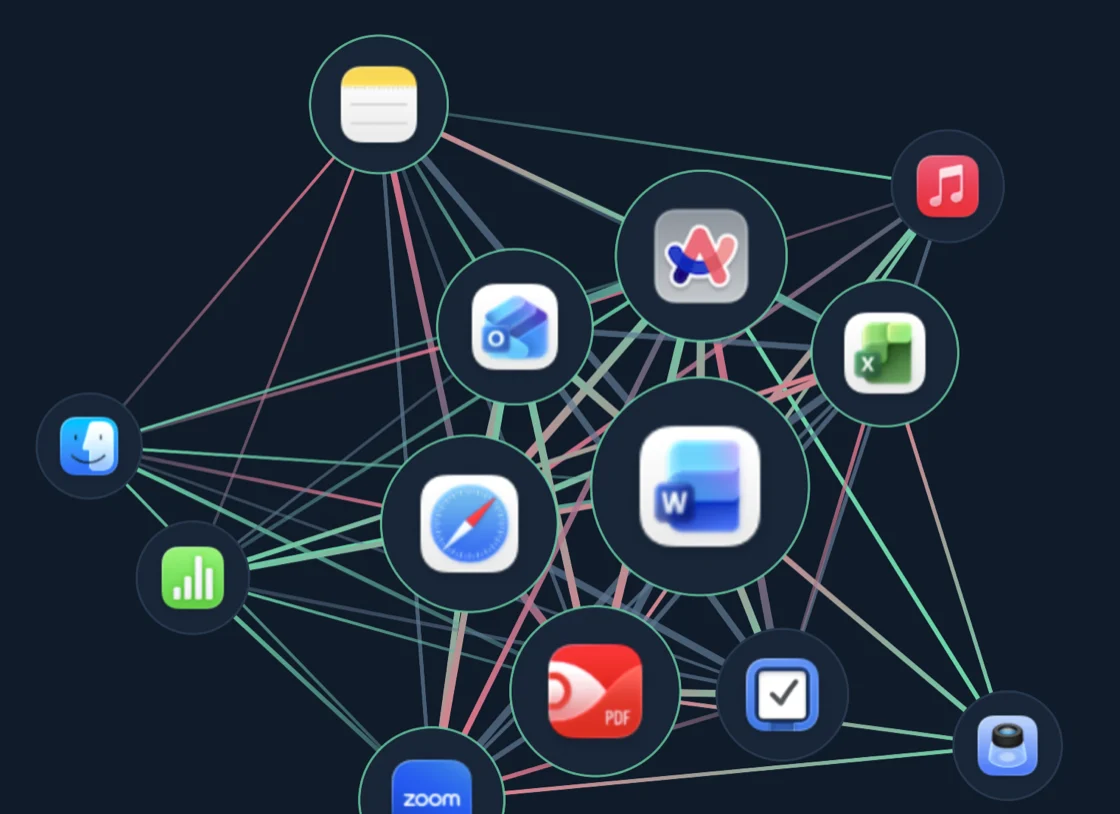
Your apps — or your busiest documents — drawn as a living map: dots sized by their time, lines for the switches between them, settling into constellations. Red line-ends mark the slides into distraction, green the way back to focus. The thing that keeps stealing your afternoon stops being a feeling — it's a red thread you can point at, and one click lands the timeline on it.

08 · JOURNAL

Your week, already written up.

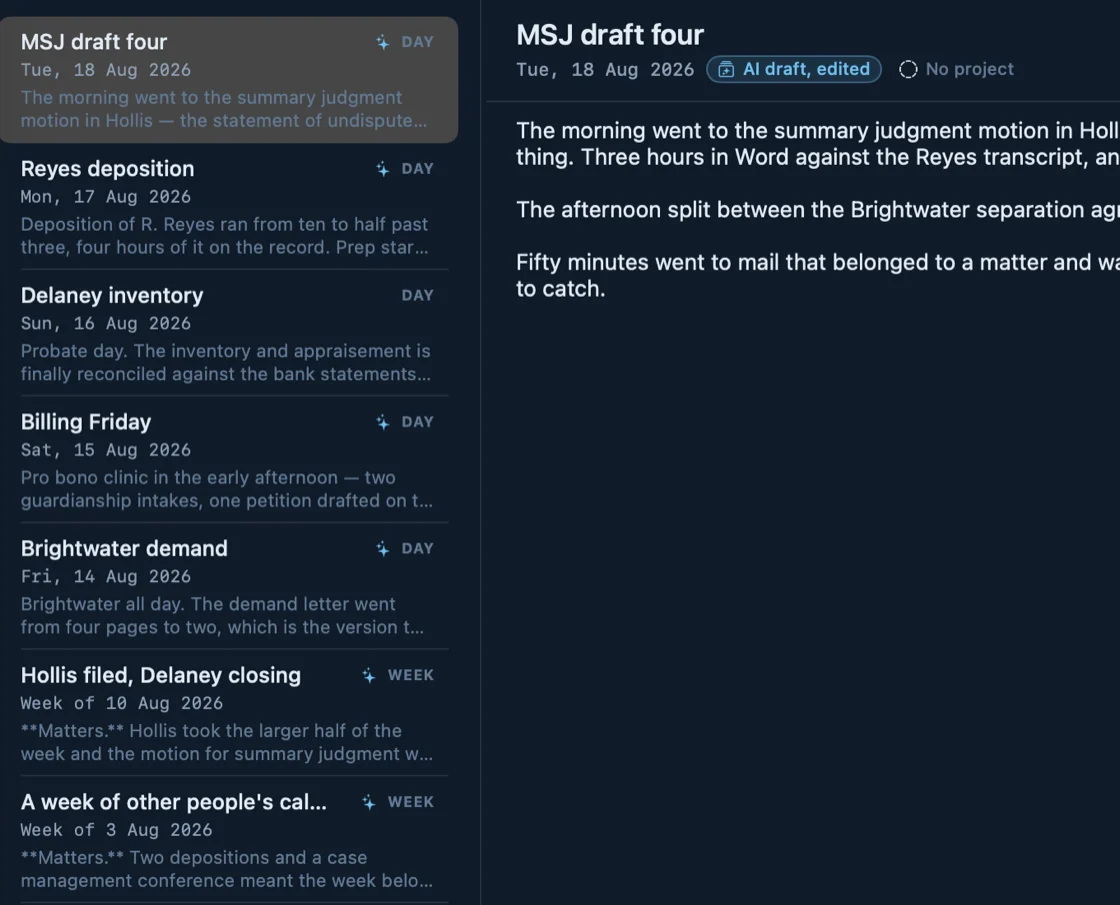
Ask for a day, a week or a month and Calliday writes the entry from what actually happened. Pick the shape — prose, bullets, headed sections — and the voice: engineer, lawyer, client report, or a reflective one meant for nobody but you. Search them later by word, by exact phrase, or by /regular expression/.

09 · BUDGETS

Budgets that tap your shoulder.

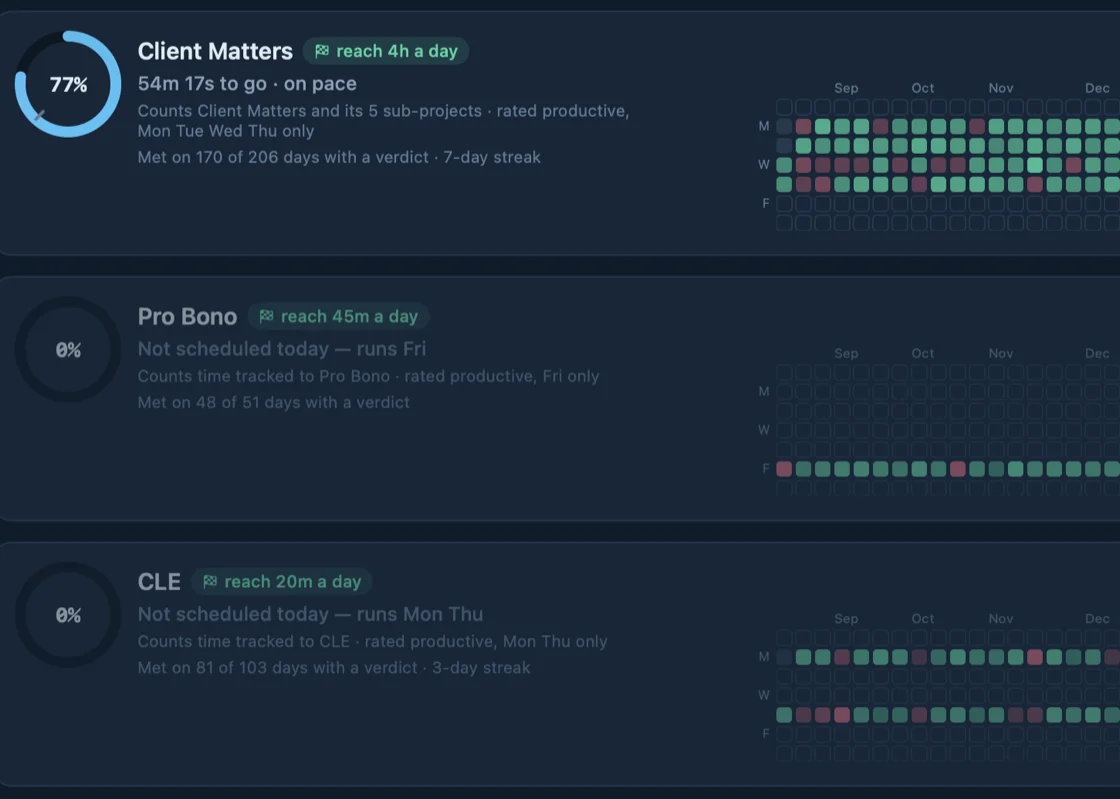
Give any project a daily allowance. The moment it's spent, Calliday says so — a real macOS notification, from the app, exactly once.

10 · TOMATOES

Pomodoros, without the timer.

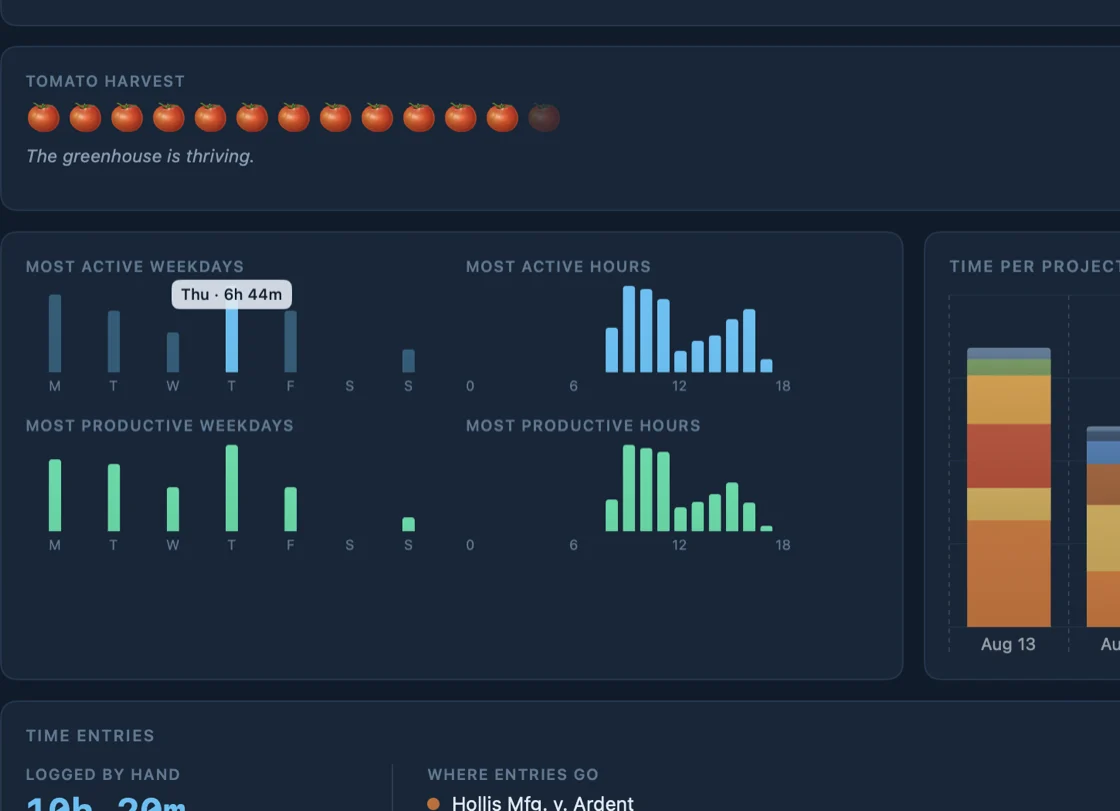
Calliday discovers tomatoes in your day — an unbroken stretch of focus makes one, no ritual required. Drift away minutes before one ripens and it asks: give up this immature fruit, or keep focus? Every fruit you grow shows on your timeline.

11 · MEETINGS

Meetings make the record too.

Screen tracking can't see a conference room. When a calendar event ends, Calliday offers to log it on your timeline — one click and the hour is accounted for.

12 · PRIVACY

Some things are nobody's business.

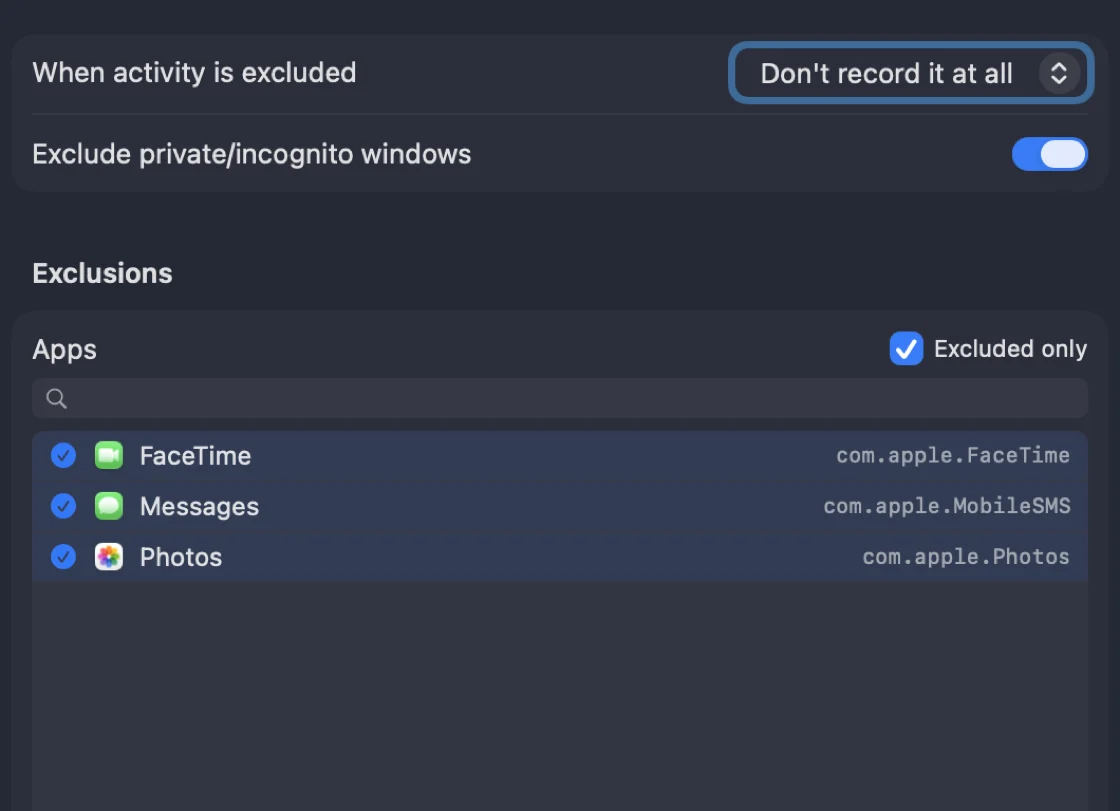
Privacy exclusions drop chosen apps, sites, window titles, and incognito browsing before they're ever written down. Not hidden — never recorded.

13 · RAYCAST

Your day, two keystrokes away.

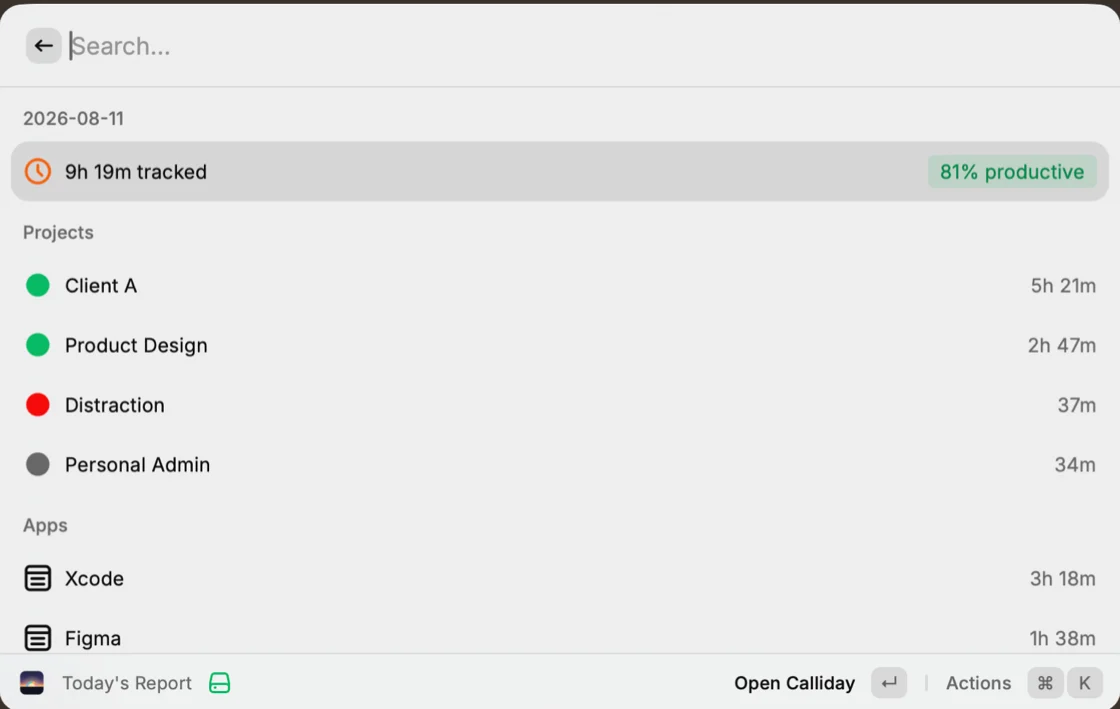
Calliday's Raycast extension puts your day behind ⌘Space: what you're tracking right now, today's report, your tomato basket, and a search across every document and page you've worked in — jump from any hit straight to the timeline. Start a timer without opening the app. The menu bar companion is always a glance away, too.
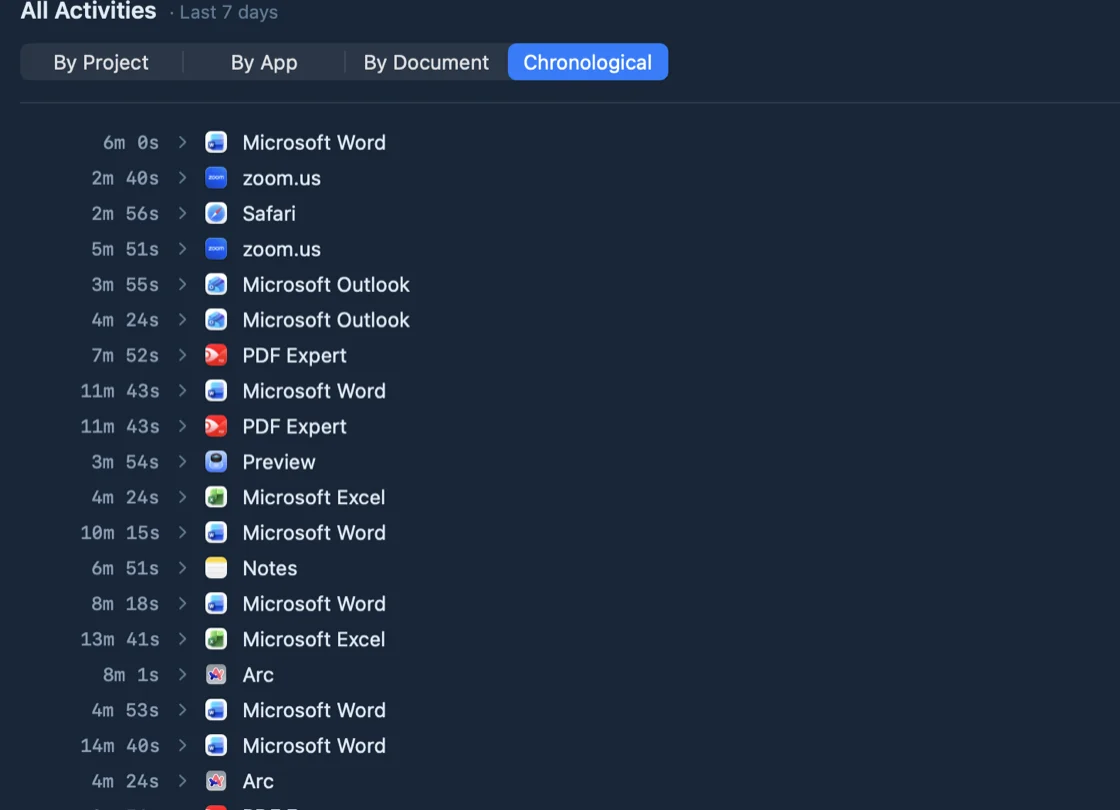
Calliday's activity list: a chronological run of the day — Microsoft Word 11m 43s, PDF Expert 7m 52s, Safari 2m 56s — each with the minutes it took
Your entire history — on your Macs
and in no one else's hands, ever
Our cloudthere is none — sync uses yours
Accountnever asked for one
Telemetryzero — not even "anonymized"
Airplane modetracks right through it
Claude · connected to Calliday
Where did my Tuesday go?
get_summary range: day · group_by: project
You tracked 7h 42m. Most of it was Client A — 4h 10m, almost all in Xcode before 3pm. Design work took 1h 14m, and meetings just 41m. A focused day.
How fragmented was my morning?
get_focus range: day
Barely at all — one unbroken 1h 52m block in Xcode and only 9 app switches before noon. Your most fragmented hour came later, 4–5pm.
The Rules screen: ordered rules — “Hollis — matter folder, path glob /Users/avery/Documents/Hollis/**” — each filing matching time into a project
✦ FILED FROM CONTEXT
Preview — contract-v3.pdf Client A
Terminal — build & deploy Client A
Notes — untitled not sure — left alone
✦ AI-SUGGESTED RULES
Figma Design
zoom.us new project Meetings
news.ycombinator.com stays uncategorized
Add 2 Selected
The Graph screen: apps drawn as nodes sized by their time, joined by coloured lines for the switches between them
The Journal screen: an entry titled “MSJ draft four”, tagged AI draft, edited — written from the day's tracked work
The Goals screen: Client Matters at 77% of a “reach 4h a day” goal, with a year of met and missed days beside it
The Overview's tomato harvest — a row of tomatoes earned by unbroken stretches of focus — above the day's activity charts
Design review 10:00 – 10:45 · Conference room
C
Design review ended Open Calliday to log it on your timeline.
Calliday's Privacy settings: “When activity is excluded — Don't record it at all”, with FaceTime, Messages and Photos on the exclusion list
Calliday's Raycast extension: today's tracked time and productivity, then time per project and per app, behind a search field

The insight graph

A living map of your attention: apps and documents as dots sized by their time, the switches between them as lines — red ends for the slides into distraction, green for the way back to focus. Distraction has a shape; now you can point at it, and click it to land on the timeline.

Multi-Mac syncNEW

One history across your Macs, through a folder your own iCloud or Dropbox carries — never a server of ours. Encrypted so only your Macs can read it, with each Mac's record keeping its own tamper-evident seal.

Automatic tracking

Records the app, window title, website, and document you're focused on — second by second, with idle time handled sensibly.

Timeline & reports

Read your day back as a timeline, roll it up into reports by project, and export when someone needs the numbers.

Projects & rules

Rules sort activity into projects automatically — by name, glob, subdomain or regular expression — and apply to time you've already tracked.

Filed from context

Time that matches no rule doesn't just sit there. Calliday reads the work around it and files it where the evidence points — and says so when it isn't sure.

Back to the exact thing

Every row on your timeline opens what it recorded — that page, that file, that email, that note, that book, that chat. Not the app: the thing itself, even in apps that publish no link to their own contents.

AI that can stay on your Mac

Use the AI included with your plan, bring your own Claude, Gemini or GPT key, or run Apple Intelligence on-device — no key, no network, nothing leaving the machine at all.

Rates & invoices

Give a client an hourly rate and Calliday totals the billable hours, holds back what you don't want to charge for, and hands you a printable invoice or a spreadsheet.

Journals, written for you

A day, a week or a month, written up from what actually happened — in the shape you pick and the voice you need, from engineer to client report.

Goals & budgets

Give a project a daily budget and get a notification the moment you've spent it. Social media, meet your allowance.

Meetings, logged

When a calendar event ends, Calliday offers to log it on your timeline — the meeting time your tracker can't see on screen.

Menu bar, Raycast & AI

A glanceable menu bar companion, a Raycast extension that puts your day behind ⌘Space, a command-line tool, and one-click Claude integration over MCP — ask "where did my Tuesday go?" and the answer is read from your own Mac.

Your day is nobody's business but yours.

Everything Calliday records lives on your Macs and in no one else's hands. No server of ours, no account, no telemetry — even multi-Mac sync runs through your own cloud folder, encrypted so only your Macs can read it. Pro adds privacy exclusions — keep chosen apps, sites, window titles, and incognito browsing out of the record entirely.

Pay once. It stays yours.

Every download starts with a free 7-day Pro trial — no account, no card. Then it's a one-time purchase, delivered by email in about a minute. No subscription, no renewal, nothing to cancel: the licence covers the Macs you bought it for, keeps working, and takes every update we ship. Your data was never ours either way — it lives on your Mac, and the licence just unlocks the app.

Starter

Everything you need to see where your day goes.
$39 lifetime · 1 Mac
+ tax
  • Automatic tracking of apps, windows, websites & documents
  • Timeline, overview & reports with export
  • Projects with unlimited custom rules
  • Daily goals & budgets with notifications
  • Meeting logging from your calendar
  • Menu bar companion, Raycast extension, CLI & Claude (MCP) integration
  • Billable rates, printable invoices & spreadsheet export
  • AI features on your own terms — Apple Intelligence on this Mac, or your own key for Claude, Gemini, ChatGPT, or any OpenAI-compatible server (Ollama, LM Studio, OpenRouter)
  • All data stays on your Mac

Your licence is issued for the Mac you buy it on and delivered by email as a one-click calliday://activate link. A two- or three-Mac licence covers the others the moment you paste the same key there — one click claims a seat. Replacing a Mac? Calliday moves the licence over itself, once you confirm from your email. And you can start small: upgrading later — to Pro, or to another Mac — costs exactly the difference.

Fair questions.

Where does my data live?

On your Mac, in ~/Library/Application Support/Calliday, and nowhere else. Calliday has no server that ever sees your activity — the only network traffic in the entire product is checking for app updates and, when you buy, the checkout itself. Multi-Mac sync doesn't change that: it moves encrypted files through a folder in your own cloud storage, and only your Macs hold the key. Export it from the app whenever you like, or read it straight from the folder with the calliday command-line tool.

What does "licensed per Mac" mean?

Your licence key is cryptographically bound to the Mac you buy it on — checkout reads a hardware fingerprint and the key is signed for that machine. A two- or three-Mac licence is one key that grows to name all of them: paste it into Calliday on the next Mac and it claims a seat with one click. When a Mac is replaced, the new one offers to take the old one's place — you confirm from your email, and the old Mac stops running Calliday. Need more than you bought? Upgrading costs exactly the difference.

What does "pay once" actually get me?

The app, for good, on the Macs your licence names — plus every update we ship. There is no renewal date, no card on file, and nothing to cancel. The key works entirely offline: Calliday never checks in to ask whether you're still allowed to run it.

Isn't upkeep on a tracker never-ending? How is one payment enough?

The upkeep is real, and worth being honest about. Knowing which book was open in Kindle, which note in Bear, which conversation in ChatGPT, which email in Spark means supporting those apps one at a time — each read from that app's own storage, and each able to change with that app's next update. macOS moves every year too, and every release brings new permissions and new ways for a tracker to go quietly wrong.

So the trade is deliberate: that work is paid for by people buying Calliday for the first time, and one day by a paid upgrade to a version that does more — not by charging you again for the one you already have. A subscription would have meant the app switching off if you stopped, on a record that was only ever on your own machine. That seemed like the wrong thing to hold over anybody.

What if I use an app Calliday doesn't record in detail?

It still tracks the time — the app, the window title, how long you were in it. What it may not know is which thing you had open inside it. If that matters to you, Pro includes a request channel: email support@calliday.app with the app and what you'd want recorded. Every request gets looked at and answered either way, and where the app keeps that detail somewhere we can read honestly, it ships in an update. Some apps encrypt it or never write it down at all — we'll tell you that plainly rather than guess at it.

What happens if I ask for a refund?

Taking the money back ends the licence: it is revoked, and Calliday returns to unlicensed on that Mac. There is nothing else to undo — no subscription to stop, no account to close.

Your data never expires either way. It stays on your Mac, still yours, still exportable — a refund takes back the app, never the record.

Can I get a refund?

Yes — 14-day money-back guarantee, no justification needed. Email support@calliday.app or use the links in your receipt. Details in the refund policy.

What are the system requirements?

macOS 14 (Sonoma) or newer, Apple Silicon or Intel. The tracker needs the Accessibility permission to read window titles — macOS will ask once.

How do I get the app? Is there a trial?

Download the DMG, drag Calliday to Applications, open it, and start the free 7-day Pro trial — no account, no card, one trial per Mac. When it clicks, buy right from inside the app: checkout opens with your Mac already identified, and your key arrives by email in about a minute.

Something's not working — who do I talk to?

A person, by email: support@calliday.app. License trouble, moving to a new Mac, billing questions, bug reports — all of it lands in the same inbox.